Software designed for the way you work
Off-the-shelf software makes you change the way you work. Custom software does the opposite: it follows your steps, your vocabulary and your habits, and it automates whatever eats your time.
Recent work, being delivered
A custom CRM for a retirement adviser
Her cases were tracked in a Notion table, with no alerts and no overview. She had to read through everything to know who to chase, which invoice was pending and which client was about to retire.
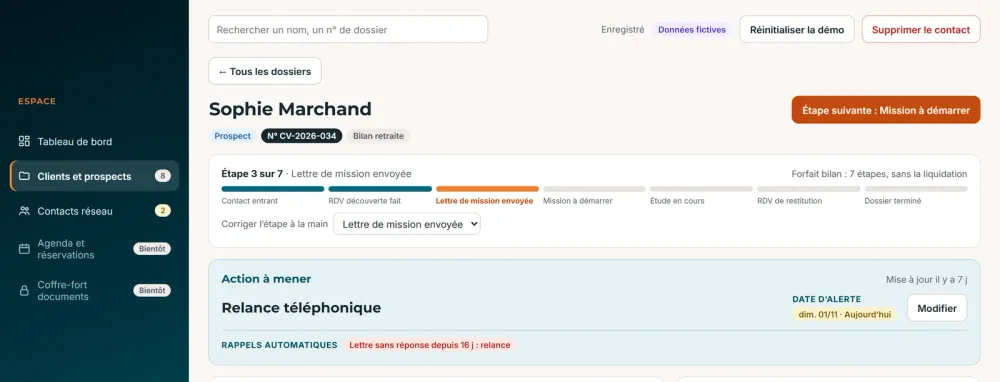
Her workspace follows the seven steps of her service, from first contact to closing the case, and tells her every morning what needs doing.
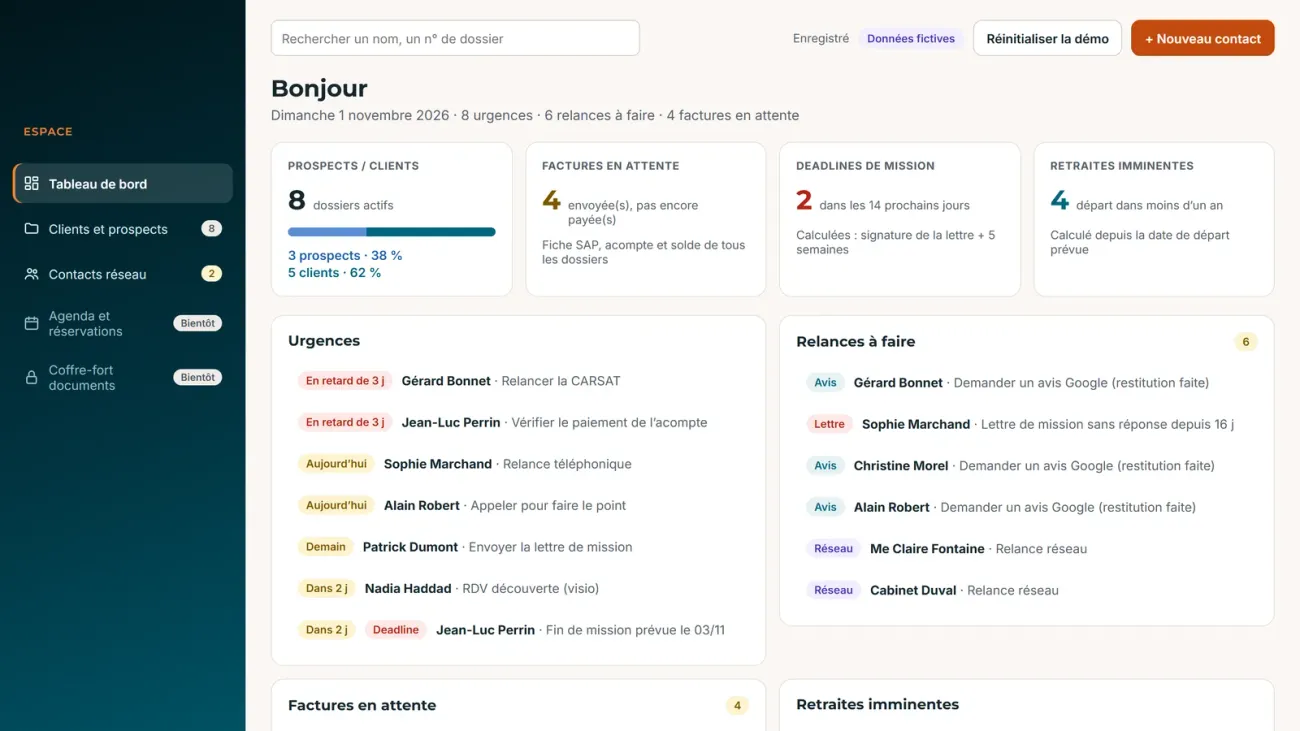
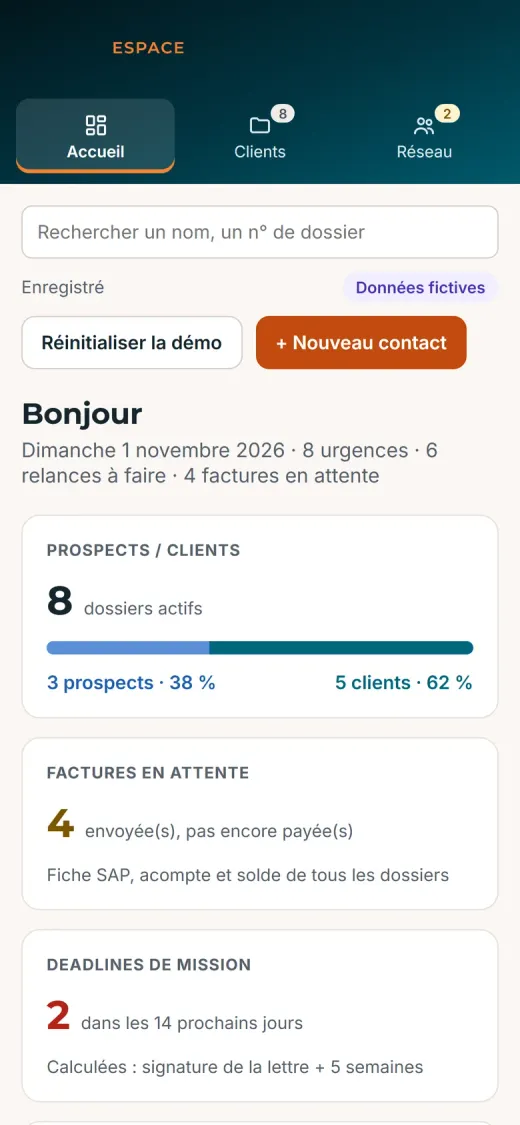
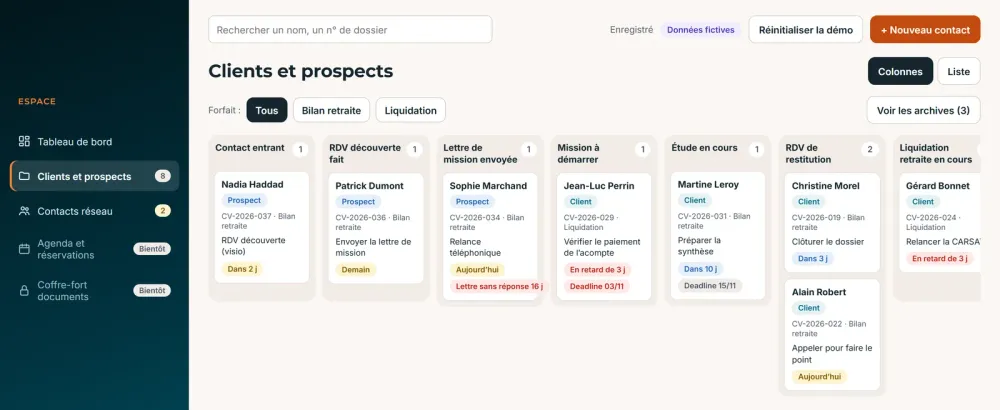
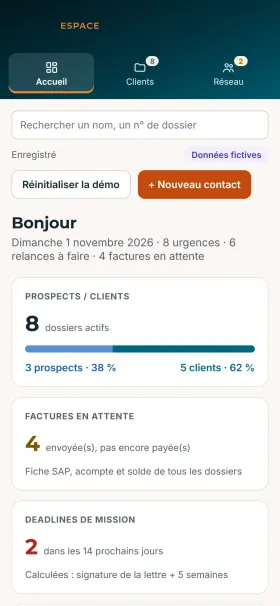
- 01A daily dashboard: urgent items, follow-ups, pending invoices, upcoming retirements
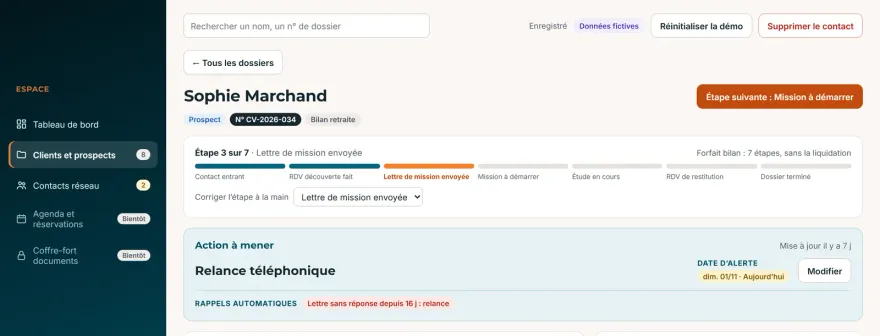
- 02Every case tracked in seven steps, with automatic reminders, for instance when an engagement letter goes unanswered
- 03A document vault for each case, with an access log
- 04Two-factor sign-in, on desktop and on a phone
Next step: a portal for her clients and online booking.
Screenshots from the demo version, with made-up data. The app is in French.
What I can build for you
If your business runs on a patched-up spreadsheet, endless email threads or software that does not quite fit, a custom tool can fix it. A few examples:
CRM and client tracking
Your leads, clients and follow-ups in one place, with the steps of your own trade, not those of generic software.
Custom management tools and ERP
Stock, orders, quotes, invoices, team schedules: a tool shaped around your business, without paying for modules you do not need.
Client portal
A secure space where your clients upload documents, follow their case and find their messages, rather than doing everything by email.
Booking and scheduling
Online appointments, automatic reminders, a shared calendar, set up around your services and your hours.
Excel and Google Sheets automation
The report you rebuild every week, the data typed in twice, the workbook that keeps crashing: I automate what repeats in your files.
Dashboards and AI
Your figures readable at a glance, and AI for text-heavy tasks: sorting requests, summarising feedback, drafting documents.
Whatever your field
Every trade has its own rules. I learn them with you before writing the first line of code.
- Trades and construction
- Consulting and practices
- Retail
- Industry and logistics
- Health and wellbeing
- Real estate
- Transport
- Training
- Non-profits
- Home services
What it changed
How long the task took before, how long it takes now. These tools were built during in-house assignments.
Weekly report
A report rebuilt by hand every week from form answers. It is now generated in three steps in Excel.
See how this report works« The workbook Kristofer set up lets me produce my weekly report effortlessly, with no risk of typing mistakes. »
Prize draw for an event
15 min → 1 min
Participants were typed one by one into a draw website, with answers and email addresses to check. Now the form data is pasted in and the workbook does the rest.
Employee departures
5 min per departure → instant
Each departure arrived by email and had to be copied into another file. The information now flows on its own.
Machine log analysis
1 h → 3 min
« Kristofer understood my problem very quickly and helped me considerably increase my productivity on my daily analyses. »
Locker management
searching and typing → instant
The same departure email frees the person's locker, and the team can assign lockers to several people at once, by work area.
How a project runs
01
A first conversation
You describe your need through the form, then we talk it over on a video call. I reply within two working days, even if it is to tell you that existing software will do the job.
02
A clear quote
What the tool will do, what it will not do, the price and the timeline, in writing. The quote is free and commits you to nothing.
03
Early versions to test
You see the tool take shape and test it on your real cases through a simple link. We fix things before delivery, not after.
04
Delivery, and what comes next
I deliver the tool with its documentation and stay reachable for what comes next: fixes, adjustments, new features.
Based in Le Havre, available anywhere
Everything happens online: video calls, test versions shared by link, remote delivery. Whether you are in Le Havre, Lyon or outside France, the way we work stays the same. And if you are in Normandy and would rather meet, we can meet.
- Video calls when it suits you
- Demos through a simple link
- Work in English or French
What it costs
Starting prices to give you an idea. Every project then gets its own free, detailed quote.
Automation
An Excel or Google Sheets file that does on its own what you do by hand: reports, imports, checks, formatting.
- Delivered in a few days
- The file is yours
- No subscription
Custom app
CRM, management tool, client portal, booking: a web app that works on desktop and on a phone.
- Test versions throughout the project
- Secure accounts and access
- Hosting and support through a monthly plan, stated in the quote
Changes and takeovers
Improving a tool you already have, taking over a file nobody wants to touch, adding AI to the way you work.
- Fixed price or day rate
- First conversation free
VAT not applicable under article 293 B of the French General Tax Code.
The tools I use
I pick the technology to fit your need. A modern web app for online tools you can use anywhere. Excel and VBA or Google Apps Script if your team lives in spreadsheets. The Claude API when there is text to process: sorting requests, summarising feedback, drafting replies from your data.
- TypeScript
- React
- Supabase
- Cloudflare
- Excel and VBA
- Google Apps Script
- Claude API
Frequently asked questions
How much does a custom tool cost?
A file automation starts at €300, a complete app at €2,000. The exact price depends on what the tool needs to do, and you get it in writing before committing.
How long does it take?
A few days to automate a file, a few weeks for a complete app. The timeline is written in the quote.
I am not in France. Is that a problem?
No. Everything is done remotely: video calls to talk, a link to test each version, delivery online.
I don't know exactly what I need.
That is fine. Describe what is wasting your time and I will tell you what can be done. If existing software is enough, I will tell you that too.
What happens after delivery?
The quote states what is included after delivery: fixes, adjustments, changes. For an online app, hosting and support go through a monthly plan stated from the start.
Let's talk about your tool
A few questions to understand what you need, and within two working days I get back to you with a first idea of the work and the price.